

How to add particles in V Blender?
Dec 24, 2025
Hey there! As a V Blender supplier, I often get asked how to add particles in a V Blender. It's a great question, and I'm here to share some tips and tricks to help you get the most out of your V Blender.
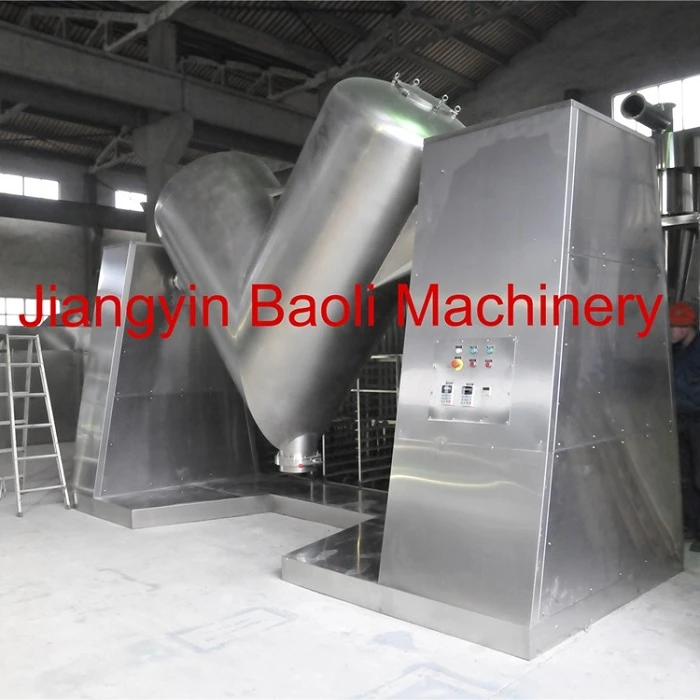
First off, let's talk a bit about what a V Blender is. A V Blender, also known as a V-Type Mixing Machine, is a popular piece of equipment used for mixing dry powders and granules. Its unique V-shaped design allows for efficient and thorough mixing, making it a go-to choice in many industries like pharmaceuticals, food processing, and chemical manufacturing.
Preparing for Particle Addition
Before you start adding particles to your V Blender, there are a few things you need to do. First, make sure the blender is clean and dry. Any leftover particles from previous mixes can contaminate your new batch, so it's important to give the blender a good cleaning. You can use a brush or a vacuum cleaner to remove any debris, and then wipe it down with a clean cloth.
Next, you'll want to measure out the right amount of particles you need. This is crucial because adding too much or too little can affect the quality of your mix. Use a scale or measuring cups to get an accurate measurement. If you're working with multiple types of particles, it's a good idea to measure them separately and keep them organized.
Adding Particles to the V Blender
Once you've prepared your blender and measured your particles, it's time to start adding them. There are a few different ways to do this, and the best method will depend on the type of particles you're using and the size of your blender.
Manual Addition
For smaller batches or when you're working with a small V Blender, manual addition is a simple and effective method. Just open the loading port on the blender and carefully pour in the particles. You can use a funnel to make sure the particles go in smoothly and don't spill outside the blender. If you're adding multiple types of particles, it's a good idea to alternate between them as you pour. This helps to ensure that the particles are evenly distributed in the blender from the start.
Using a Conveyor System
If you're working with larger batches or a continuous mixing process, a conveyor system can be a great option. You can set up a conveyor to feed the particles directly into the blender. This way, you can control the flow rate of the particles and ensure a more consistent addition. Make sure the conveyor is properly aligned with the loading port of the blender to prevent any spillage.
Automated Dispensing Systems
For more precise and efficient particle addition, an automated dispensing system is the way to go. These systems can be programmed to dispense specific amounts of particles at specific intervals. This is especially useful when you're dealing with sensitive materials or when you need to maintain a high level of accuracy in your mix. Many modern V Blenders come with the option to integrate an automated dispensing system.
Tips for Even Mixing
Adding the particles is just the first step. To get a well-mixed batch, you need to make sure the particles are evenly distributed throughout the blender. Here are some tips to help you achieve this:
- Mixing Time: The length of time you run the blender is crucial. Too short, and the particles won't be fully mixed; too long, and you might end up with over-mixing, which can cause issues like particle degradation. Check the manufacturer's guidelines for the recommended mixing time based on the volume and type of particles you're using.
- Mixing Speed: The speed at which the blender rotates also affects the mixing quality. In general, a slower speed is better for gentle mixing, especially if you're working with fragile particles. You can start with a lower speed and gradually increase it if needed.
- Baffles and Agitators: Some V Blenders come with baffles or agitators inside the mixing chamber. These can help to break up clumps and improve the mixing efficiency. If your blender has these features, make sure they're in good working condition.
Troubleshooting
Even when you follow all the steps correctly, you might still run into some issues. Here are some common problems and how to solve them:
- Uneven Mixing: If you find that the particles aren't mixed evenly, it could be due to a few reasons. First, check the mixing time and speed. You might need to increase the mixing time or adjust the speed. Also, make sure the particles are being added evenly. If you're using a conveyor or automated system, check for any blockages or malfunctions.
- Particle Clumping: Clumping can occur if the particles are too moist or if they have a high electrostatic charge. To prevent clumping, make sure the particles are dry before adding them to the blender. You can also use anti-static agents to reduce the electrostatic charge.
Our V Blender Offerings
We offer a wide range of V Blenders, including the V Type Multi Cereals Bread Mix Powder Mixer and the Automatic Mixture Machine. Our V Blenders are designed with high-quality materials and advanced technology to ensure efficient and reliable mixing. Whether you're a small-scale producer or a large industrial manufacturer, we have a V Blender that's right for you.
If you're in the market for a V Blender or have any questions about adding particles in a V Blender, don't hesitate to reach out. We're here to help you find the best solution for your mixing needs and guide you through the process of purchasing the right equipment.

References
- Manufacturer's manuals for V Blenders
- Industry best practices for powder and granule mixing